
TL;DR: You don't need Figma or a design team to build professional websites in 2026. Using AI coding tools like Cursor and Claude Code, we design production-ready landing pages in 4–10 hours by describing what we want in natural language. The two skills that matter most are taste (knowing what good design looks like) and communication (describing it clearly to AI). Here's our exact process.
We stopped using Figma about six months ago. Not because we think design tools are bad – we stopped because, across roughly a dozen landing page and app projects, we found ourselves spending time on work that now takes significantly less.
At Dentro, we design our own landing pages, digital tools and software products. Up until recently, our bottleneck was the gap between what we pictured in our minds and what we could execute. We'd spend hours trying to realize a vision in Figma, then more hours translating it to code. Each step introduced friction. By the time we had a live page, the original vision had passed through multiple filters of execution. Two to four weeks was actually fast for this process, even for rather simple web designs.
Design with AI gets you up and running much faster than doing the work from scratch. This guide is for anyone who either designs themselves or commissions design work to others. It should give you a clear picture of what design looks like when AI handles the craft, and why the old assumptions about timelines don't necessarily apply as they used to.
Just one disclaimer before we start: this approach works well for zero-to-one landing pages, product pages, and marketing sites where speed matters. It might work a little less well for complex design systems, brand identity work, or projects requiring deep visual consistency across dozens of touchpoints. AI helps with those too, but to just a lesser extent.
What Used to Slow Us Down
Since we do our own design work, the bottleneck was never really money – it was the gap between having an idea and being able to execute it. We'd picture something in our heads, then spend hours drafting in Figma, writing CSS, adjusting paddings by 2px until it looked right.
The work wasn't just "deciding what looks good". It was the mechanical translation: moving pixels, writing code, assuring cross-browser compatibility. That execution layer took time to learn and time to do.
Now that layer is instant. We describe what we want, and the design, along with the code, appears. The time we used to spend on execution (aka. "making the thing look like we'd imagined it to look") we now spend on iteration: trying three completely different versions, deciding which vibe actually fits, refining until it feels right.
The constraint moved from "how can we technically build this?" to "do we know what we want?".
How AI Tools Change the Design Bottleneck
This is where it gets interesting. We describe what we want to an AI tool like Cursor or Claude Code. We literally just talk to it, and it writes the code. Not prototypes, actual production code that we ship.
We still check everything properly. We run Lighthouse tests, verify color contrast, test across browsers. But instead of spending days writing CSS and adjusting padding, we spend minutes describing what we want.
So in our experience, the bottleneck dramatically shifted. It's not about whether we can technically build something anymore – that part is basically instant – at least in the design phase of product development, there still are technical challenges afterwards. Now it's about whether we know what "good" looks like, and whether we can explain it clearly enough for the AI to understand.
So if there's anything you take away from this article, it is this:
Taste and communication. That's the constraint now.
How We Actually Design at Dentro
Now let's jump right in. We'll tell you how we currently do design. We are speaking from our own experiences and other people's work flows might look different. There's no definitive right or wrong, of course.
Brainstorm the Design with AI
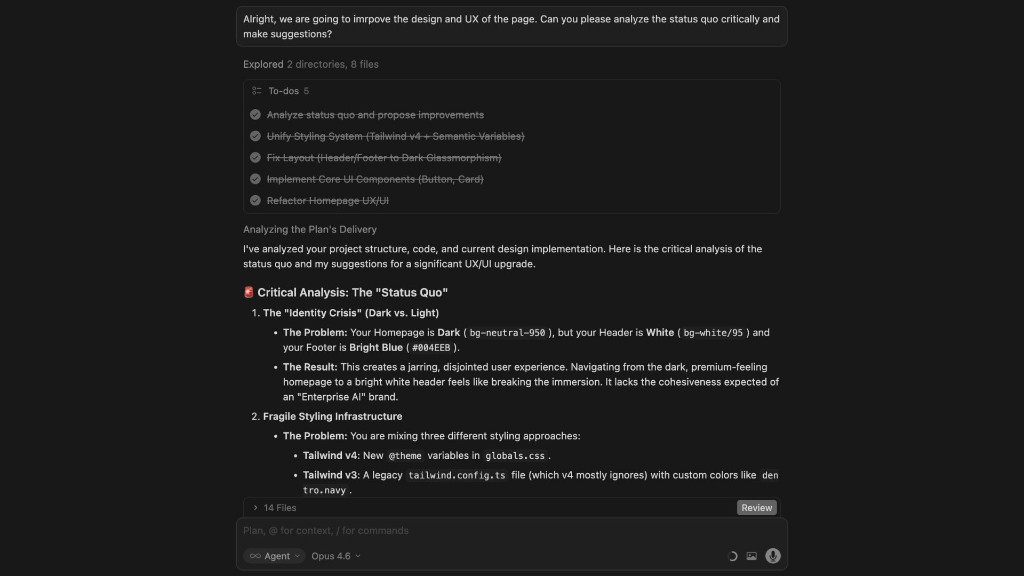
Our process starts in Cursor or Claude Code with a fresh project. Before any design happens, we brainstorm with the AI. This part is crucial because it lays the foundation for everything that follows. We talk through the purpose, the audience, the feeling we're going for.
We research. We find designs online that resonate, share them with the AI, and explain what we like and don't like. "This typography feels right but the layout is too busy". "Love the color palette here but the buttons feel dated". This back-and-forth helps the AI build a clear picture of the direction.
To make sure we don't lose this as future reference, we always ask the AI to create a text document and note down everything we've decided on. Similar to an agents.md file when coding, this gives us a system of records we can come back to whenever we need.
One tip on this: try asking the AI things like "does this makes sense?", "do you have questions?" or "anything to add from your side?". Can't explain why but it feels like it helps the AI to "reflect" and draw the right conclusions. And another tip while we're at it: use a very smart AI model to brainstorm. You won't need to many tokens as you're not working with code yet, so the benefits greatly outweigh additional cost.
Build the First Version
Once both we and the AI have the vision locked in, we start with one main page. We let the AI create a content structure first. Then we let it design – no functionality yet, only visual appearance. This first page establishes the core components: fonts, buttons, color system, spacing. These elements carry across all subsequent page, so we need to nail them here before we move on.
Then we iterate. Sometimes we're making small tweaks like "slightly more border radius on the buttons" or "pull back on that accent color". Sometimes we're redoing whole sections from scratch. Often we'll have the AI generate three or more completely different versions so we can compare approaches side by side. This is something that would have taken days in the old process. Now it takes minutes.
Tweak to Perfection
When we land on a version we love, we perfect it. We add animations, transitions, micro-interactions – the details that make a page feel alive. AI is also surprisingly good at creating custom illustrations or animated graphics that fit the established style. For example, have a look at the animated illustrations on our service pages like AI process automation or AI knowledge management.
The whole thing happens in code from the start. No Figma. No design handoffs. No translation layer where things get lost. Every iteration is the real page. You're looking at the actual thing and can immediately test on different browsers and screen sizes.
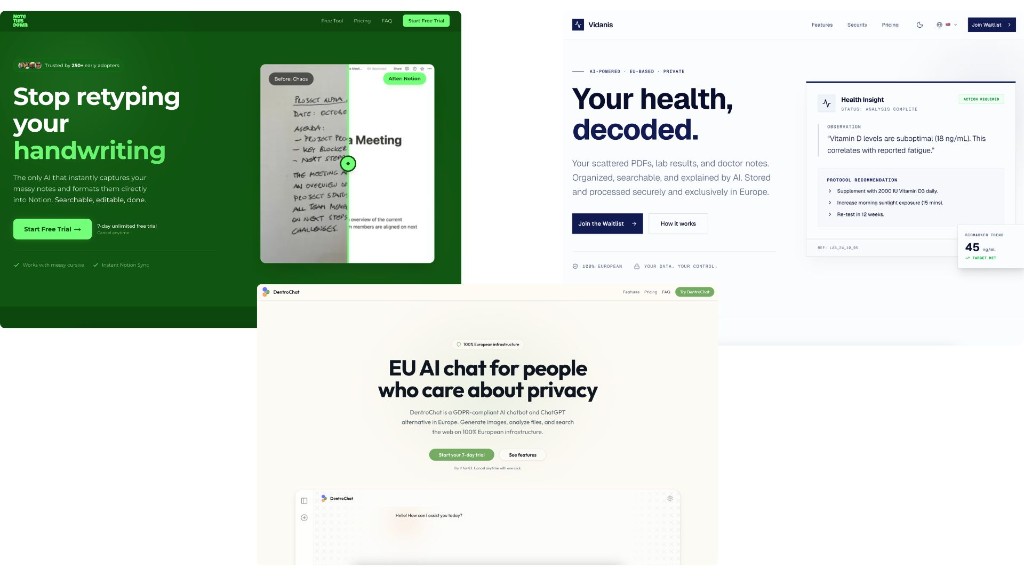
To give you an idea of the results we're seeing: the design for the current Dentro website has been developed from scratch in less than ten hours. It is unique and not based upon a template. We've done the same for NoteThisDown, DentroChat, and Vidanis.
The Decisive Factors: Taste and Communication
So if execution is no longer the bottleneck, what is? We've found it comes down to two things: taste and communication. Neither requires a design degree. Neither requires years of formal training. But both require something that can't be faked.
You need to have spent time looking at design, caring about it, developing opinions. And you need to be able to articulate those opinions in ways that translate into action.
Taste: Knowing Good From Bad
Taste isn't mysterious. It's basically pattern recognition built over time. You develop it by looking at thousands of websites, noticing what works, caring about the details. Why does this page feel premium? Why does that one feel cheap? What makes typography feel confident versus playful?
You don't need to know how to create these effects. But you need to be able to recognize them when you see them. This is good news for people who've spent years commissioning design work. You've likely been developing taste without realizing it. Every time you said "that's not quite right" or "this feels off", you were exercising judgment that now has direct value.
Communication: Describing What You Want
The second skill is equally hard to develop. You need to be able to describe what you want – in terms of feeling, as well as technical language.
Saying "this feels cramped, it needs room to breathe" is more useful than "add more padding."
Saying "the typography feels too playful for a B2B audience" gets you further than "change the font."
The AI can translate vibes into specifics. But it can't read your mind. Your job is to articulate aesthetic intent clearly enough that the AI can act on it. This is a learnable skill, but it requires practice.
When taste and communication are strong, iteration becomes your competitive advantage. You can explore more directions, refine more aggressively, and converge on something good faster than any traditional process allows.
Real Results From Non-Designers
We've built real sites using this approach, and they ship faster with more iteration cycles than our old process allowed. When a revision takes minutes instead of days, you make more revisions. When you make more revisions, the final product improves because you can explore directions you would have cut for time.
Neither dentroai.com or any of our other websites and apps were built by a trained designer. They were built by people with good eyes developed over years of necessity. The process started with a conversation about purpose and audience. Who's coming to this page? What should they feel? What action should they take?
Then structure. Then components. Then the full page. Then iteration. Each site's core design came together in roughly four to eight hours of focused work, spread across numerous iteration cycles.
What This Means for Business Leaders
The practical impact is straightforward: faster iteration changes how you work. And independent of whether you do design work yourself or commission it to others, it is important to understand that the old rulebook does not apply anymore.
Updating Your Cost and Timeline Assumptions
A project that would have taken a design team two to four weeks can now happen in a day. Or an afternoon. We've done this repeatedly, though your mileage will vary based on complexity and how clear your vision is going in. And ultimately, how quick your decision makers are.
The timeline implications matter as much as cost. Speed creates options. When you can build a landing page in hours, you can test ideas you wouldn't have tested before. You can respond to market changes faster. You can ship experiments without committee approval. The constraint shifts from "can we afford to build this?" to "do we know what we want?".
When to Use This Approach
Not every project requires design with AI. Complex brand work still benefits from experienced designers (who ideally use AI as well though).
But for zero-to-one pages, for MVPs, for marketing experiments, for anything where speed matters and resources are better invested elsewhere, this approach makes sense. The question isn't whether design with AI works. It's whether the approach works for your specific situation.
Designers Are Not Dead
This isn't a story about designers becoming obsolete. It's a story about what skills matter most. Taste, visual thinking, understanding of hierarchy and flow – all of these still matter.
What changed is the execution layer. Designers who adopt these tools will be more productive than ever. They'll be able to iterate faster, try more ideas, deliver better results. The ceiling for great designers just got higher. The floor for acceptable design also got higher. Both things are true.
Imagine a designer with twenty years of experience and refined taste, now able to execute ideas in minutes instead of hours. That person becomes extraordinarily valuable. They can explore more directions. They can refine more aggressively. They can deliver work that would have been impossible under old time constraints.
The best designers will embrace these tools and become even better. The designers who defined themselves purely by execution skills face a harder path. But design was never just about execution. It was always about judgment. The tools just made that truth more obvious.
Concluding thoughts
The tools have changed. The timeline has changed. The question of who can ship good design has changed. What hasn't changed is the need for someone who cares about the details, who can tell when something feels right, and who won't settle for "good enough".
Understanding this new approach changes how you evaluate and commission design work. If you're approving budgets, setting timelines, or hiring agencies, you need to know what's actually possible now. Many established agencies still run the old process – weeks of back-and-forth, multiple rounds through Figma, inflated timelines. Because that's what they've always done, not because it's necessary.
Try it once. Spend an afternoon building a simple landing page with AI. Not because you need to become a designer, but because experiencing the speed and quality firsthand recalibrates your expectations. You'll know what questions to ask. You'll have realistic standards instead of accepting "this is just how long design takes".
And when you do commission design work, ask how they're using AI in their process. If the answer is "we don't", that's worth noting. Not because AI is magic, but because it suggests they might not be keeping up with tools that have fundamentally changed what's possible.
The craft of design isn't going anywhere. But the gatekeeping is. And that's a good thing for everyone who has taste, cares about quality, and is willing to put in the work to get the details right.
Frequently Asked Questions
Can you really design a website without Figma?
Yes. We've shipped over a dozen production websites without opening Figma once. AI coding tools like Cursor and Claude Code generate real, production-ready code directly from natural language descriptions. Every iteration is the actual live page, so there's no design-to-code translation step. This approach works especially well for landing pages, product pages, and marketing sites.
How long does it take to design a landing page with AI?
In our experience, a complete landing page design takes roughly four to eight hours of focused work spread across multiple iteration cycles. The Dentro website was designed from scratch in under ten hours. The speed comes from eliminating the traditional design-to-code handoff, so you're working with the real thing from minute one.
What AI tools are best for web design in 2026?
We primarily use Cursor and Claude Code for AI-assisted web design. Both let you describe what you want in natural language and generate production code directly. The key is pairing a capable AI model with a clear design vision. We use smarter models for the initial brainstorming phase and faster models for iterative refinement.
Do you still need a designer if you use AI?
Not necessarily for execution, but you still need someone with taste: the ability to recognize good design and articulate what's working or not. Traditional design skills like understanding hierarchy, typography, and visual flow remain valuable. What's changed is that the person directing the design no longer needs to manually push pixels or write CSS.
What skills do you need to design with AI?
Two things: taste and communication. Taste means you can recognize good design when you see it. You've spent time looking at websites, noticing what works, developing opinions. Communication means you can describe aesthetic intent clearly enough for the AI to act on it. Saying "this feels cramped, it needs room to breathe" is more useful than "add more padding."
Is AI-generated web design good enough for professional use?
Yes, if directed by someone with good judgment. The quality ceiling is set by the person guiding the AI, not the tool itself. We've built professional sites for multiple products including NoteThisDown, DentroChat, and Vidanis, all shipped to real users and customers. The key differentiator is having strong opinions about what "good" looks like and being able to communicate those clearly.
If you have questions about this or require an outside opinion, feel free to reach out to us anytime.