



TL;DR: Your website might rank well on Google but remain invisible to AI assistants like ChatGPT or DentroChat because most AI crawlers can't execute JavaScript – they only see raw HTML. To fix this, use server-side rendering or pre-rendering, test your pages by viewing source or disabling JavaScript, and implement structured data markup to help AI systems understand your content.
Why a Website AI Crawler Sees Things Differently Than Google
Your website ranks on page one of Google. Traffic flows in steadily. Everything seems fine. But when someone asks ChatGPT or Claude about your industry, your business is nowhere in the response. The reason is simple: website AI crawler access works fundamentally differently than traditional search engine indexing. What Googlebot sees and what AI systems see are often two very different versions of your site.
Many modern websites load their content dynamically – meaning the text and images only appear after your browser runs some code in the background. You see the full page, but a website AI crawler often only sees an empty shell. On top of that, more sites are actively blocking AI systems (you might not even know that yours does too). A 2025 analysis of crawler restrictions found roughly 25% of the top 1,000 websites restrict website AI crawler access, with news and media sites blocking most aggressively.
What Googlebot Can Do That a Website AI Crawler Cannot
To understand this difference, we first need to talk about JavaScript. JavaScript is a programming language that makes websites interactive – it powers things like dropdown menus, content that loads as you scroll, and pages that update without refreshing. When you visit a modern website, your browser (Chrome, Safari, Firefox) downloads the page and then runs JavaScript code to build much of what you actually see on screen.
Google has heavily invested in its Web Rendering Service (WRS), a sophisticated system that runs JavaScript and builds pages much like your browser does. This means Googlebot sees your website almost exactly as you do when you visit it. Google's rendering typically happens very fast for most pages.
Most website AI crawler systems lack this capability. Google's AI crawler (used by Gemini as well) is an exception and can render via WRS, but most others skip JavaScript entirely. Running JavaScript at scale requires enormous computational resources. For companies building Large Language Models (LLMs) – the technology behind tools like ChatGPT – rendering millions of pages simply is not cost-effective. They take what they can get quickly: the raw HTML your server sends before any JavaScript runs. Think of it like receiving a recipe card versus watching someone actually cook the dish. The recipe card (raw HTML) contains basic instructions, but you miss all the finished results that only appear when someone follows those instructions (runs the JavaScript).
The Raw HTML Reality for Website AI Crawler Access
Most AI crawlers that visit your site capture only what exists in the initial HTML response – the basic code your server sends before your browser does any work. This includes meta tags (hidden labels describing your page), heading structures, static text content, and hyperlinks. Everything else vanishes.
If AI tools cannot read your service pages, you will not appear when someone asks ChatGPT to compare vendors in your category. Your site might present rich, valuable content to human visitors while appearing nearly empty to AI bots scanning for indexable text.
The JavaScript Rendering Gap and Website AI Crawler Limitations
Modern websites are dynamic. They feature smooth, app-like experiences where pages feel fast and responsive. They also create a fundamental problem for AI visibility, because they rely heavily on JavaScript to display content.
Client-Side vs. Server-Side Rendering
This distinction matters more than most business owners realize, so let us break it down in simple terms.
Client-side rendering means your visitor's browser (the "client") does the heavy lifting. It downloads JavaScript code, then builds the page content on your computer or phone. The advantage is a smooth, app-like experience. The downside is that website AI crawler systems often cannot see the finished result – they only see the raw ingredients before assembly.
Server-side rendering means your web server builds the complete HTML page before sending it to visitors. When a website AI crawler arrives, it receives a fully-built page with all content visible – no assembly required. The downside is that your server works harder, which can slow things down during traffic spikes.
Pre-rendering is a related approach where pages are generated as complete HTML files ahead of time, rather than built fresh for each visitor.
Why Your Modern Website Might Be Completely Blank to AI
Consider a typical e-commerce site built with dynamic, JavaScript-heavy technology. The product catalog loads on the fly based on user preferences. Category pages pull content from databases. Even the navigation menu might be built by JavaScript in your browser. To a website AI crawler, this sophisticated site appears as an empty shell: perhaps a logo, some footer links, and little else.
This is a significant problem, but there are practical solutions. In this article, we will cover exactly how to test whether a crawler can actually see your content, and what steps you can take to make your pages readable without requiring technical rebuilds.
Testing What an AI Crawler Actually Sees
Do not guess. Within minutes you can see the exact HTML a website AI crawler gets from your most important pages. These tests reveal whether your setup actually works.
The View Page Source Test
Right-click anywhere on your homepage and select "View Page Source" (not "Inspect Element" – that shows the finished page after JavaScript runs). This shows the raw HTML before JavaScript does any work. Search for your company name, product descriptions, or key service offerings. If you cannot find them in this view, AI crawlers cannot find them either.
Red flags include pages where the body section contains only script tags (JavaScript instructions) and empty containers. Success looks like this: all the information you want an AI crawler to know about your business – your services, contact details, key offerings – appears directly in the source code.
Disable JavaScript in Your Browser
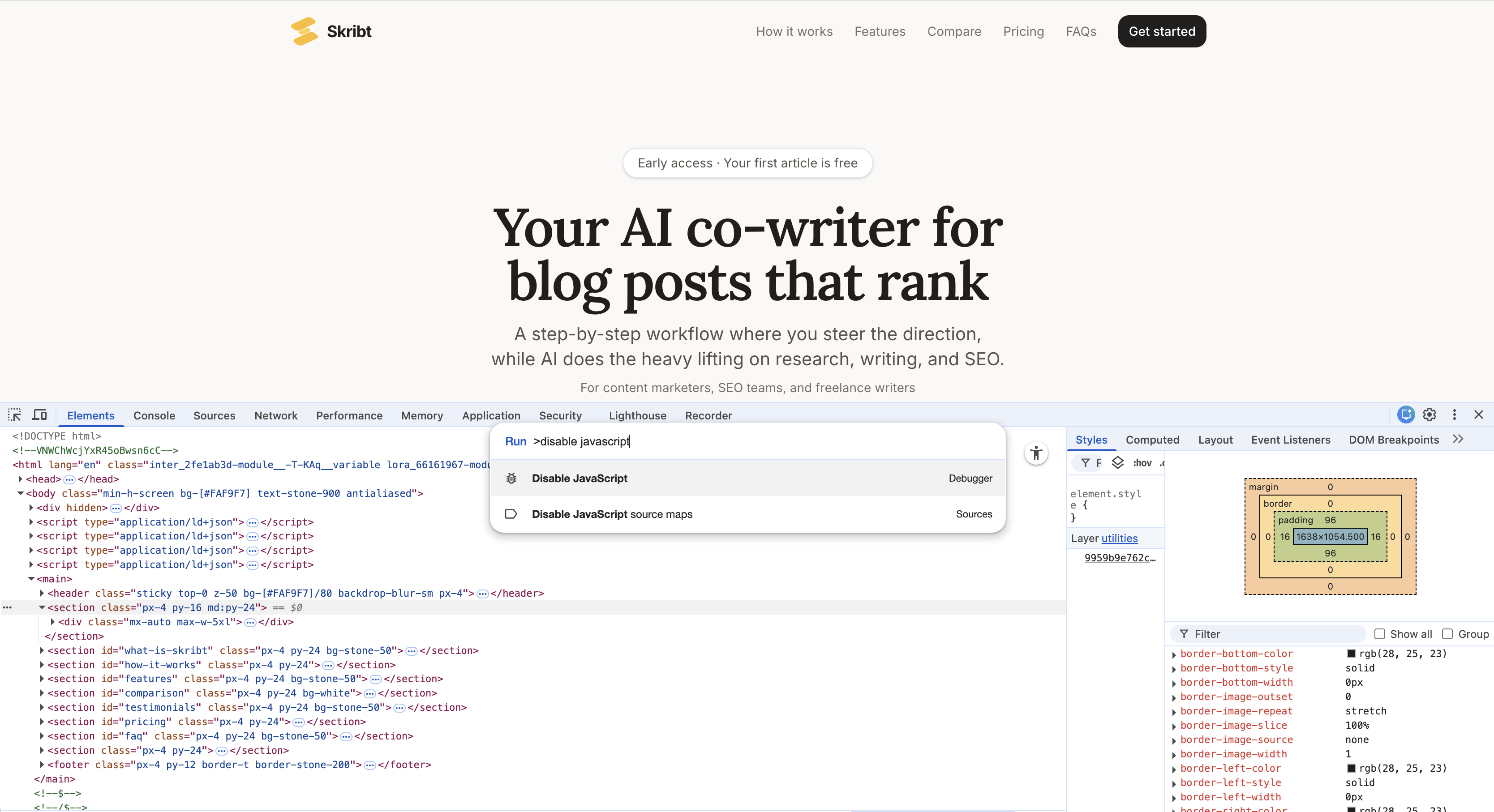
This test simulates what most AI crawlers experience. In Chrome, press F12 to open Developer Tools, then press Ctrl+Shift+P (or Cmd+Shift+P on Mac) and type "Disable JavaScript". Press Enter, then refresh your page.
What remains is what AI crawlers see. If your main content disappears, you have a rendering problem. Re-enable JavaScript the same way when finished testing.
Check Your Robots.txt File
Every website has a robots.txt file – a simple text file that tells crawlers what they can and cannot access. Visit yourdomain.com/robots.txt directly. Look for lines mentioning GPTBot, ClaudeBot, CCBot, or anthropic-ai. If you see "Disallow: /" after any of these names, you are actively blocking those AI crawlers. See here an example of a robots.txt file for Dentro's AI co-writing product Skribt:
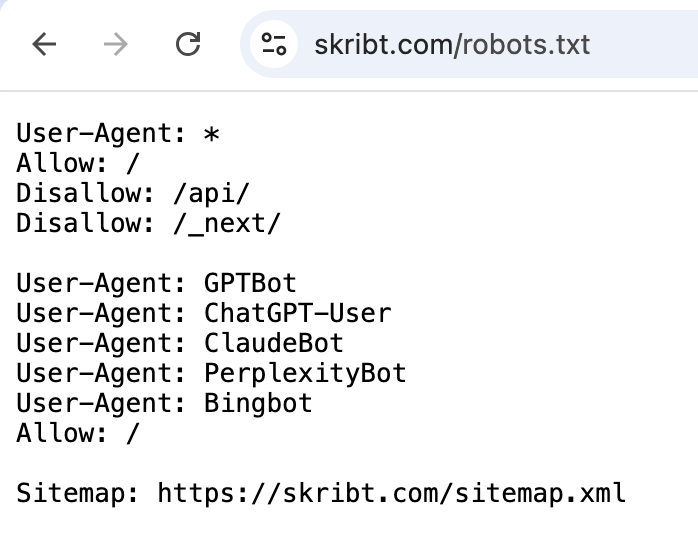
Sometimes hosting providers or security plugins add these blocks without your knowledge. Research shows 34.2% of news outlets now block OpenAI's GPTBot, but for most businesses, blocking AI bots means sacrificing visibility in a growing discovery channel.
Terminal Command for Raw HTML
For those comfortable with command-line tools (or willing to try), this curl command retrieves exactly what crawlers receive:
curl -A "Mozilla/5.0" https://yourwebsite.com
This downloads your page's raw HTML and displays it as text. Search for your key content. If the output includes your headings and descriptions, your HTML is crawlable. If it shows mostly JavaScript references and empty containers, you have work to do.
Structured Data: Helping a Website AI Crawler Understand Your Content
Even when AI crawlers can access your content, they need context to understand it properly. Structured data provides that context through a standardized vocabulary that machines parse reliably. If you are building knowledge management systems or customer-facing tools, the same principles apply: machines need explicit labels to process information correctly.
What Schema Markup Actually Is
Schema markup is a way of labelling your content so machines understand what it means, not just what it says. It uses a standardized vocabulary from Schema.org that all major search engines and AI systems recognize.
JSON-LD (JavaScript Object Notation for Linked Data) is the recommended format because it sits cleanly in your page's code without mixing into your visible content. Think of it as a behind-the-scenes label that tells AI systems: "This page describes a product with this price, these reviews, and this availability status".
Structured data helps search engines and AI better understand your website, making it easier for systems to correctly identify your products, locations, and FAQs. As AI systems play larger roles in how people discover businesses, this machine-readable context becomes increasingly valuable.
Essential Schema Types for Business Websites
Four schema types cover most business needs:
- Organization: Your company name, logo, contact information, and social profiles. Essential for brand recognition in AI responses.
- Article: For blog posts and news content. Includes author, publication date, and headline. SEO plugins like Yoast can help generate schema for WordPress sites.
- Product: Pricing, availability, reviews, and specifications. Critical for e-commerce visibility.
- FAQ: Question-and-answer pairs that AI systems can extract directly for conversational responses.
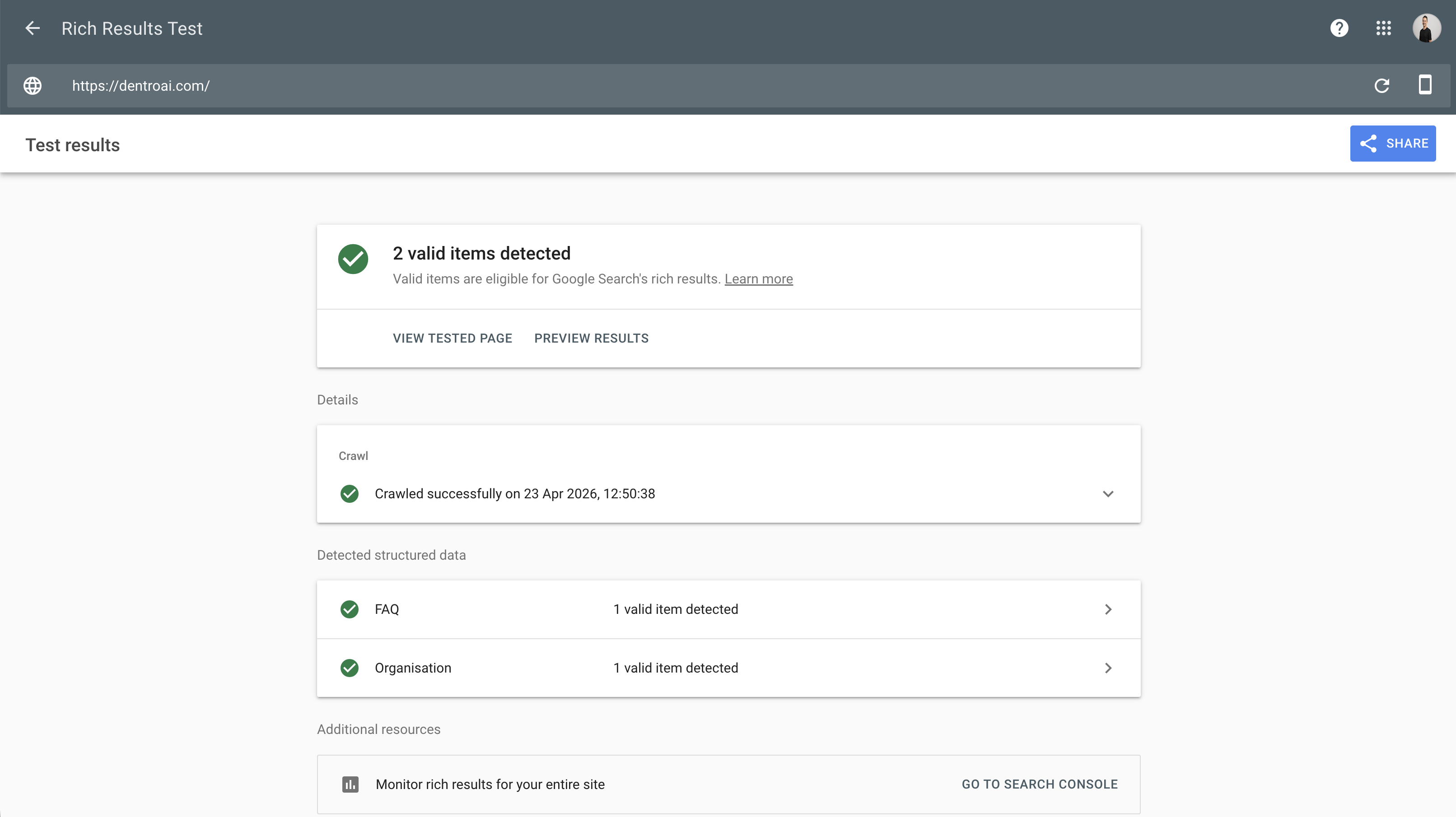
Validate your schema using Google's Rich Results Test. Paste your URL, and the tool will report whether your structured data is valid and which types it detected. Implementing structured data today prepares your content for future technologies and AI applications.
Your Website AI Crawler Checklist (Non-Technical)
Making your site visible to AI bots requires both quick fixes and longer-term technical changes. Knowing which is which helps you prioritize effectively. This section focuses on what to do, not why – we covered the reasoning above.
Quick Wins You Can Check Today
Start with what you can verify immediately. Check your robots.txt for unintended AI crawler blocks. Run the view-source test on your five most important pages. Disable JavaScript and confirm your core content remains visible. If these tests reveal problems, you have concrete evidence to bring to your development team.
Server response time matters too. Use Google's PageSpeed Insights and note the Time to First Byte (TTFB) metric – this measures how quickly your server starts responding to requests. High TTFB can reduce how efficiently bots crawl your site and may lead to fewer pages fetched per visit. While there is no universal threshold, consistently slow responses (over one second) warrant investigation.
Ask your developer these specific questions:
- "What is our average TTFB on product and service pages?"
- "Are we using server-side caching, and is it configured for our main templates?"
- "Do any pages rely entirely on client-side JavaScript for their main content?"
- "Has anyone modified robots.txt in the past year, and do we have version history?"
- "Can we pre-render our top 20 pages without a full site rebuild?"
Developer Conversations to Have
Armed with test results, discuss these options with your technical team. Server-side rendering or static site generation can solve JavaScript visibility problems, though implementation complexity varies by framework. Structured data implementation typically requires developer involvement but follows well-documented patterns. Ask specifically about pre-rendering critical pages if a full site rebuild seems too costly. Understanding the cost of an AI project can help you budget for these technical improvements.
One protective note: before any major changes, document your current search rankings and traffic patterns. Technical migrations occasionally cause temporary ranking drops. Having baseline data helps you identify and address issues quickly.
Conclusion: Optimizing for Website AI Crawler Visibility
Crawler visibility comes down to three core issues: JavaScript-rendered content that bots cannot see, robots.txt rules that block access entirely, and missing structured data that helps AI understand what your pages contain. If you are exploring broader AI automation for your business, getting your web presence right is a sensible first step.
What actually needs to happen:
- Quick fixes: Run the view-source and robots.txt tests on your most important pages. Fix any blocks and add Organization and FAQ schema to your homepage. These changes take hours, not days.
- Bigger changes: If the tests reveal JavaScript is hiding critical content, discuss server-side rendering or pre-rendering with your development team.
How fast you tackle this is entirely up to you and your team's capacity. Some businesses knock everything out in a weekend. Others fit it around other priorities. The point is that you do not need to rebuild your entire site – start with the tests, fix the obvious blocks, add basic schema, and address website AI crawler rendering issues only where the tests show real problems.
If you want a second opinion on how visible your site is to AI assistants, feel free to reach out to us anytime.